
I wanted to retrieve data from a DynamoDB table using an AWS Lambda function.
Sounds simple enough, right?
Create a database, write a Lambda function, retrieve some data, and call it a day.
Well, AWS had other plans. 💀
My Lambda function ran successfully but couldn’t actually read anything from DynamoDB. And that little plot twist turned into a surprisingly useful lesson about IAM roles, policies, and why AWS doesn’t let services access everything just because you asked nicely.
In this project, I’ll walk through how I connected AWS Lambda to DynamoDB, troubleshot an AccessDeniedException, and secured the connection using the principle of least privilege.
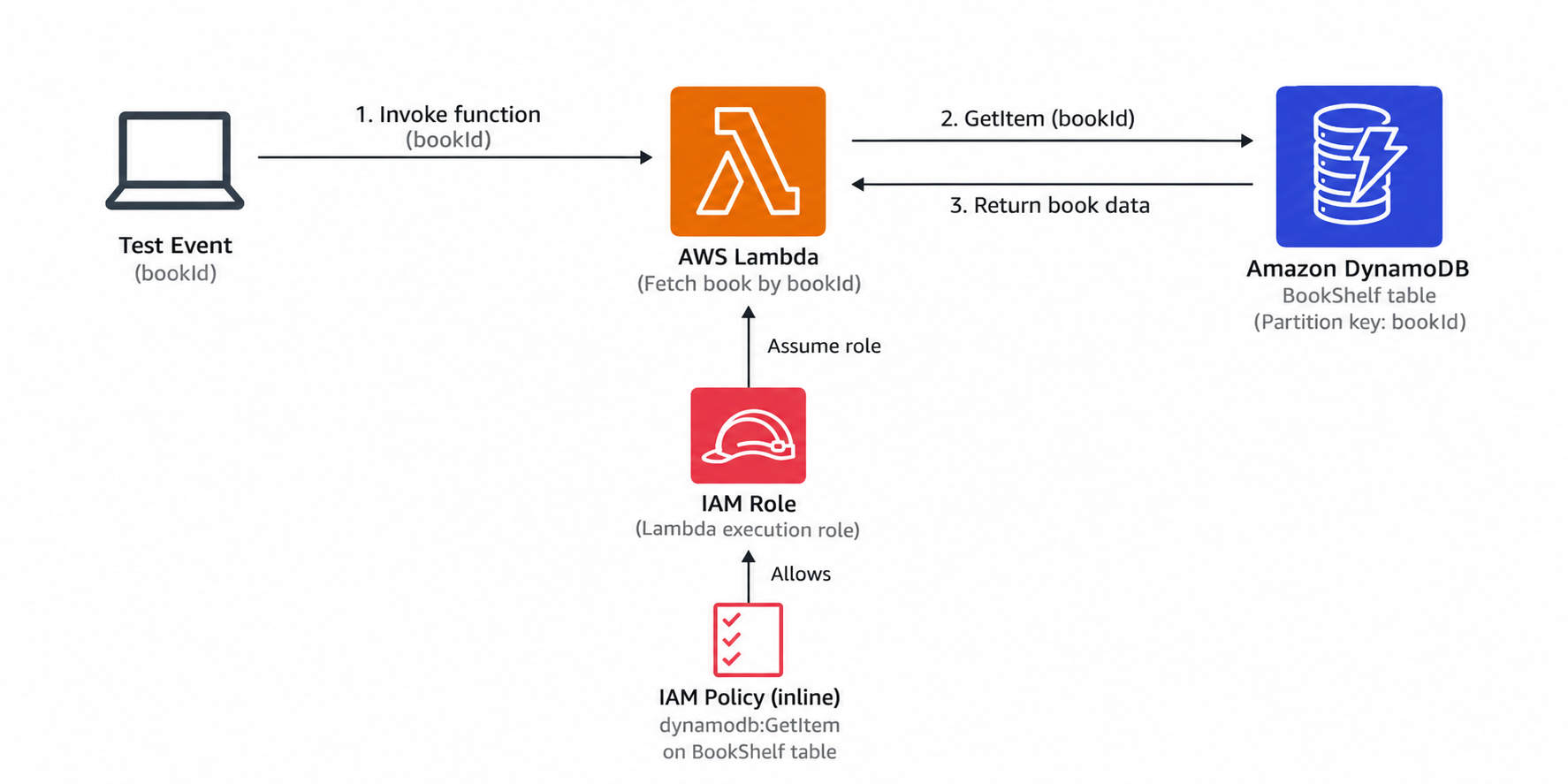
Tools and Technologies
- Amazon DynamoDB: A fully managed NoSQL database for storing my book records.
- AWS Lambda: Runs the JavaScript code that retrieves the records.
- AWS IAM: Controls what the Lambda function is allowed to access.
- AWS SDK for JavaScript: Allows my function to interact with DynamoDB programmatically.
- Amazon CloudWatch Logs: Captures function logs for monitoring and debugging.
1. Setting Up My DynamoDB Table
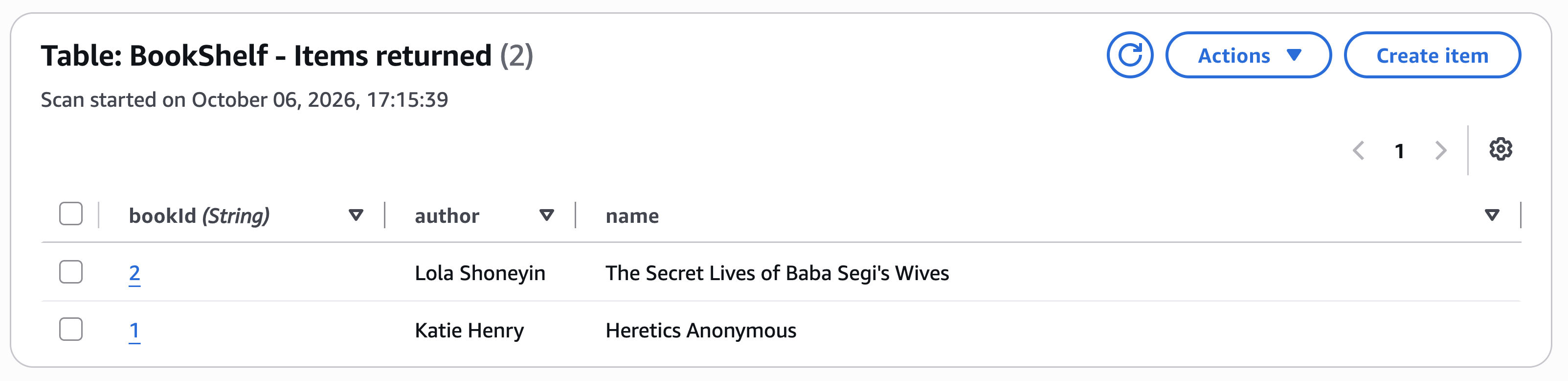
I started by creating a DynamoDB table called BookShelf and adding two book records.
DynamoDB is a fully managed NoSQL database that stores data as items containing attributes. Unlike traditional relational databases, DynamoDB doesn’t require every item to have the same attributes, apart from those used in its primary key.
For my table, I used bookId as the partition key.
Under the hood, DynamoDB uses the partition key’s value to determine which partition stores an item, helping distribute and retrieve data efficiently.
Since bookId is my table’s entire primary key, I can use it to retrieve individual books.
2. Creating My AWS Lambda Function
Next, I created an AWS Lambda function to retrieve data from my table.
AWS Lambda is a serverless compute service that lets you run code without provisioning or managing servers yourself. AWS handles the underlying infrastructure and automatically scales execution based on demand.
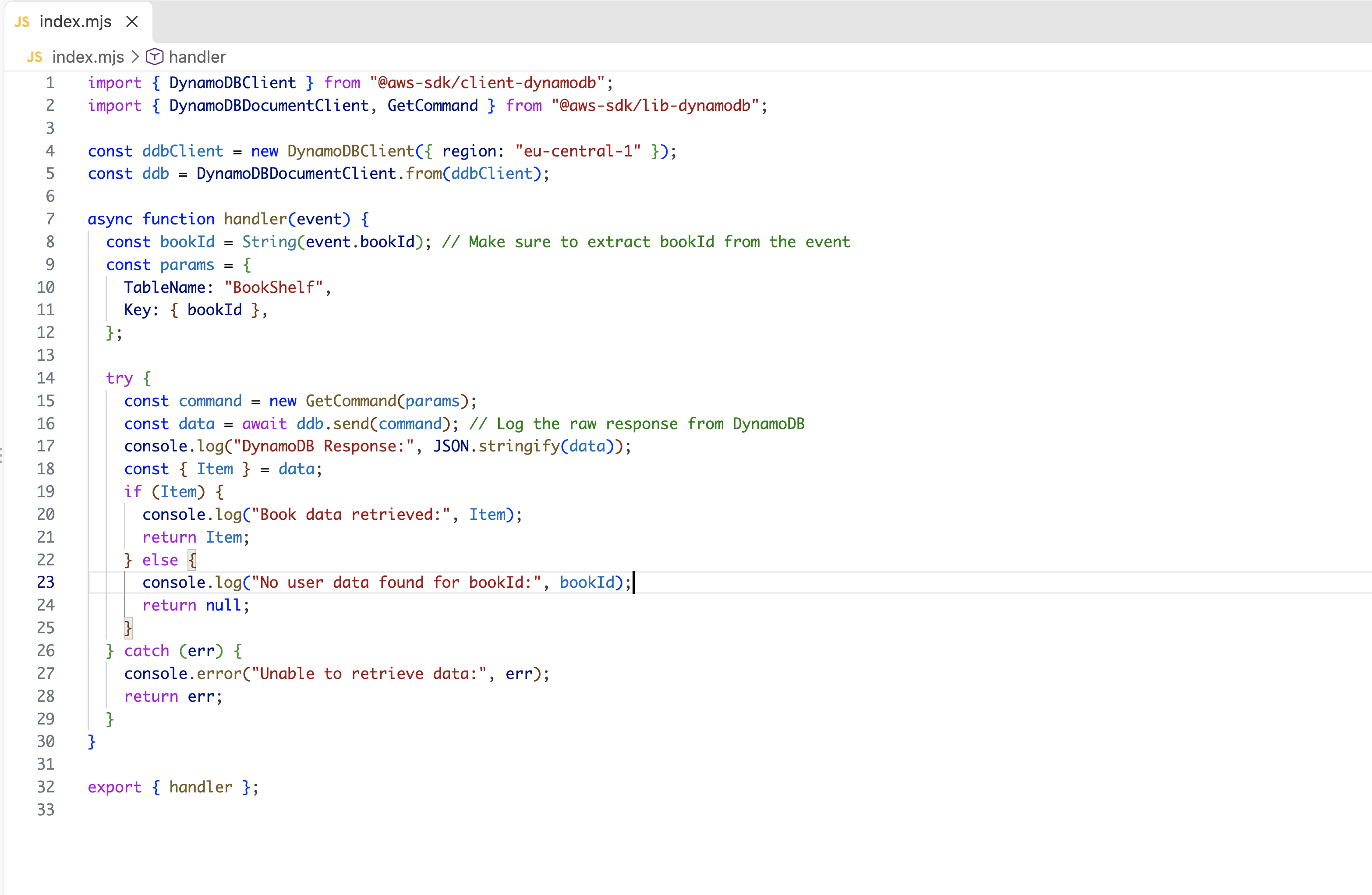
For this project, my Lambda function uses the AWS SDK for JavaScript to communicate with DynamoDB.
The function does three things:
- Accepts a
bookIdfrom a JSON test event. - Uses DynamoDB’s
GetItemoperation to retrieve the corresponding book. - Returns the book data or an error message if something goes wrong.
Understanding Lambda Execution Roles
Every Lambda function needs an IAM execution role, which determines what AWS resources the function can access.
When I created my function using the Lambda console’s default execution role, it included permissions to write logs to Amazon CloudWatch Logs.
However, it didn’t automatically have permission to access DynamoDB. A small detail that was about to become very important. 👀
3. Testing My Lambda Function
To test my function, I created a JSON test event containing the bookId I wanted to retrieve.
{
  "bookId": 1
}
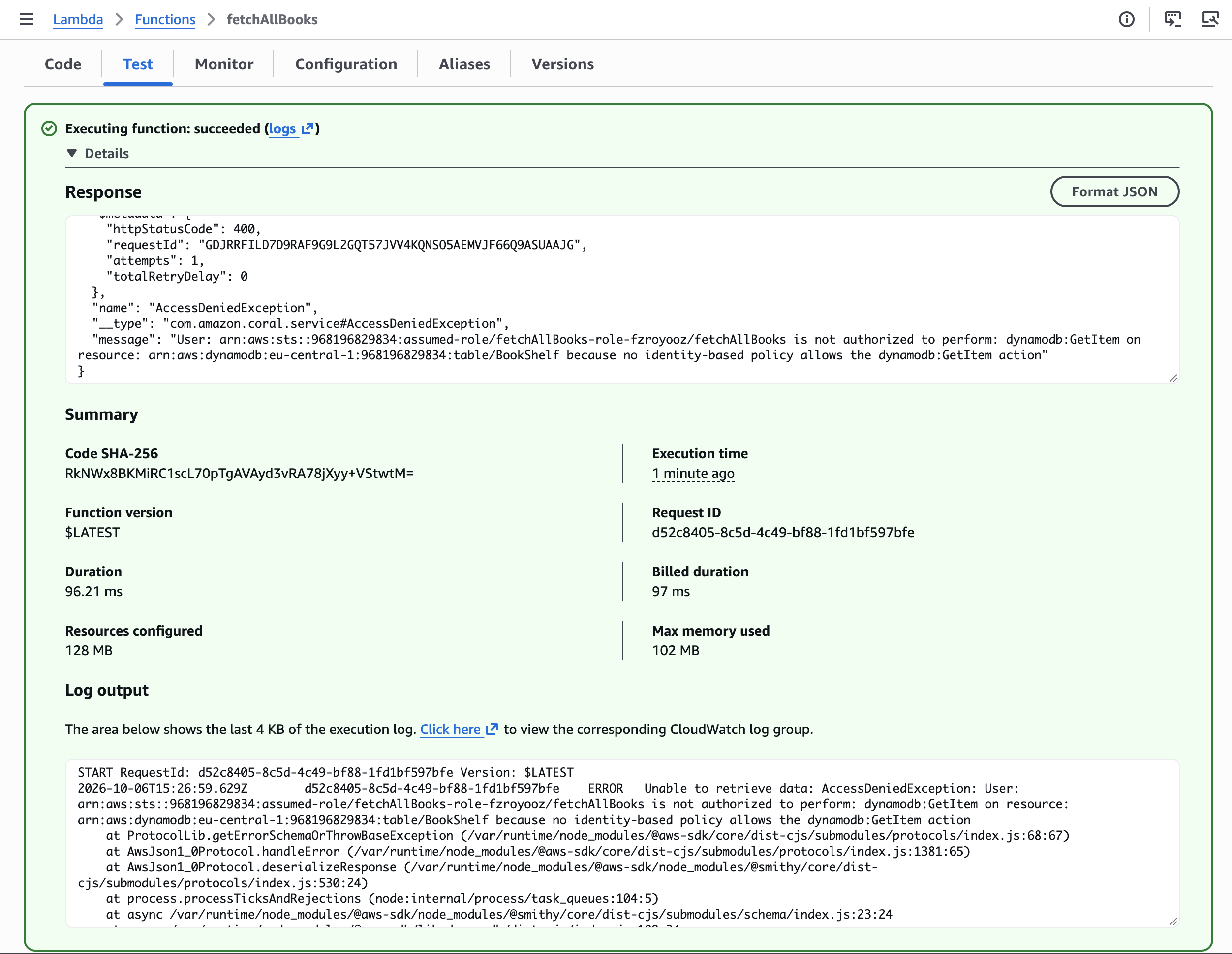
I ran the test, and AWS displayed a success message.
Except there was one tiny problem.
My function’s response contained an AccessDeniedException. 💀
The invocation itself had completed, but the database operation had failed.
Because my function caught the error and returned it as a response, Lambda reported a successful invocation even though the book wasn’t retrieved.
The error indicated that my function’s execution role lacked permission to perform the dynamodb:GetItem action.
Essentially, Lambda knew what I wanted it to do. It just wasn’t allowed to do it.
4. Fixing the IAM Permissions
To resolve the error, I needed to grant my Lambda function permission to retrieve items from DynamoDB.
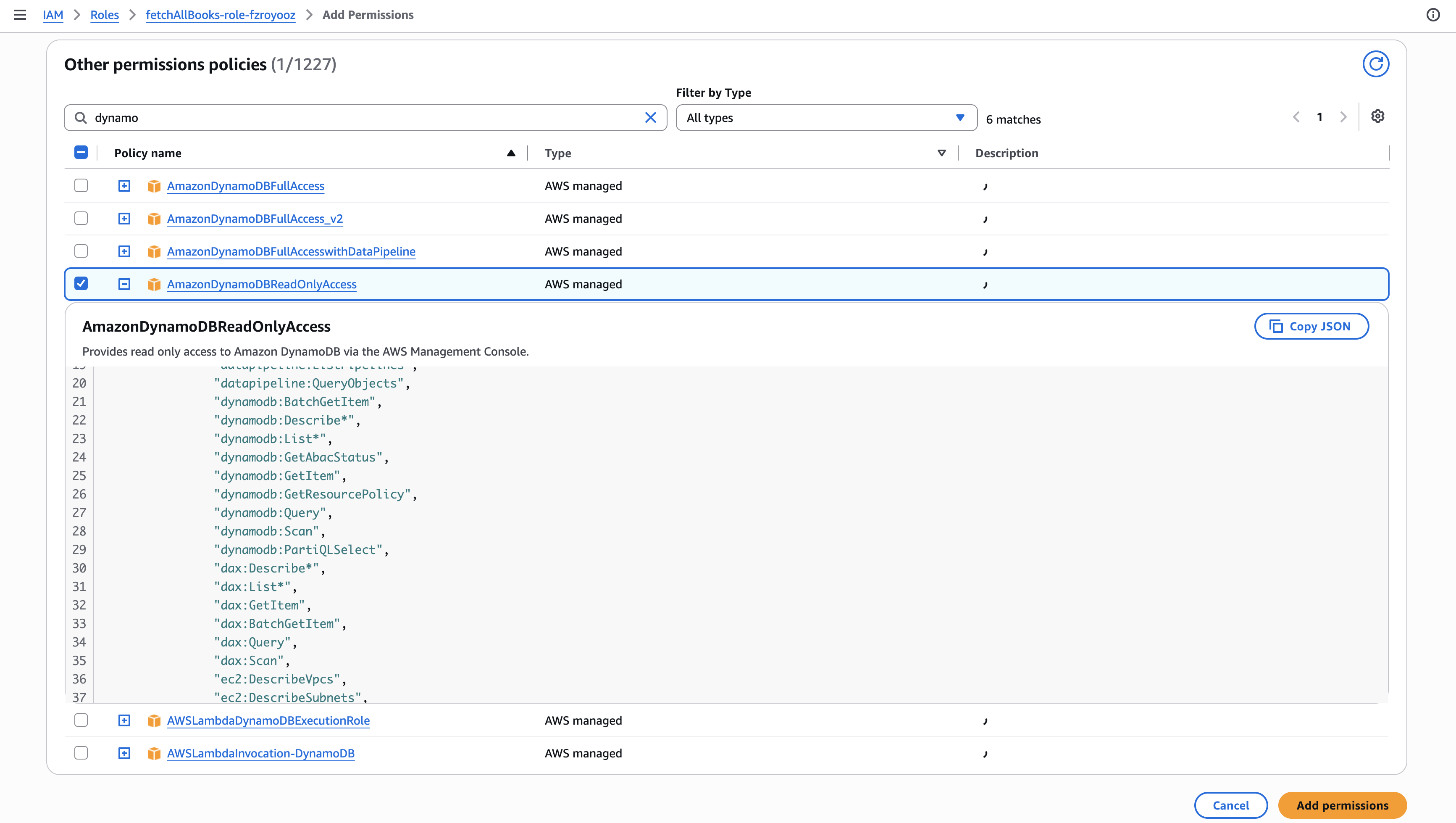
I explored several AWS-managed policies, including:
- AWSLambdaDynamoDBExecutionRole: Grants read permissions for DynamoDB Streams and write permissions for CloudWatch Logs.
- AWSLambdaInvocation-DynamoDB: Grants permissions to read DynamoDB Streams.
- AmazonDynamoDBFullAccess: Grants broad access to DynamoDB and related services.
- AmazonDynamoDBReadOnlyAccess: Grants broad read-only access to DynamoDB.
There’s an important distinction here: reading DynamoDB Streams is not the same as reading items directly from a DynamoDB table.
Since my function needed to retrieve an item using GetItem, I chose AmazonDynamoDBReadOnlyAccess and attached it to my Lambda execution role.
This provided the missing permission, although it granted more access than my function actually needed.
I’d deal with that next.
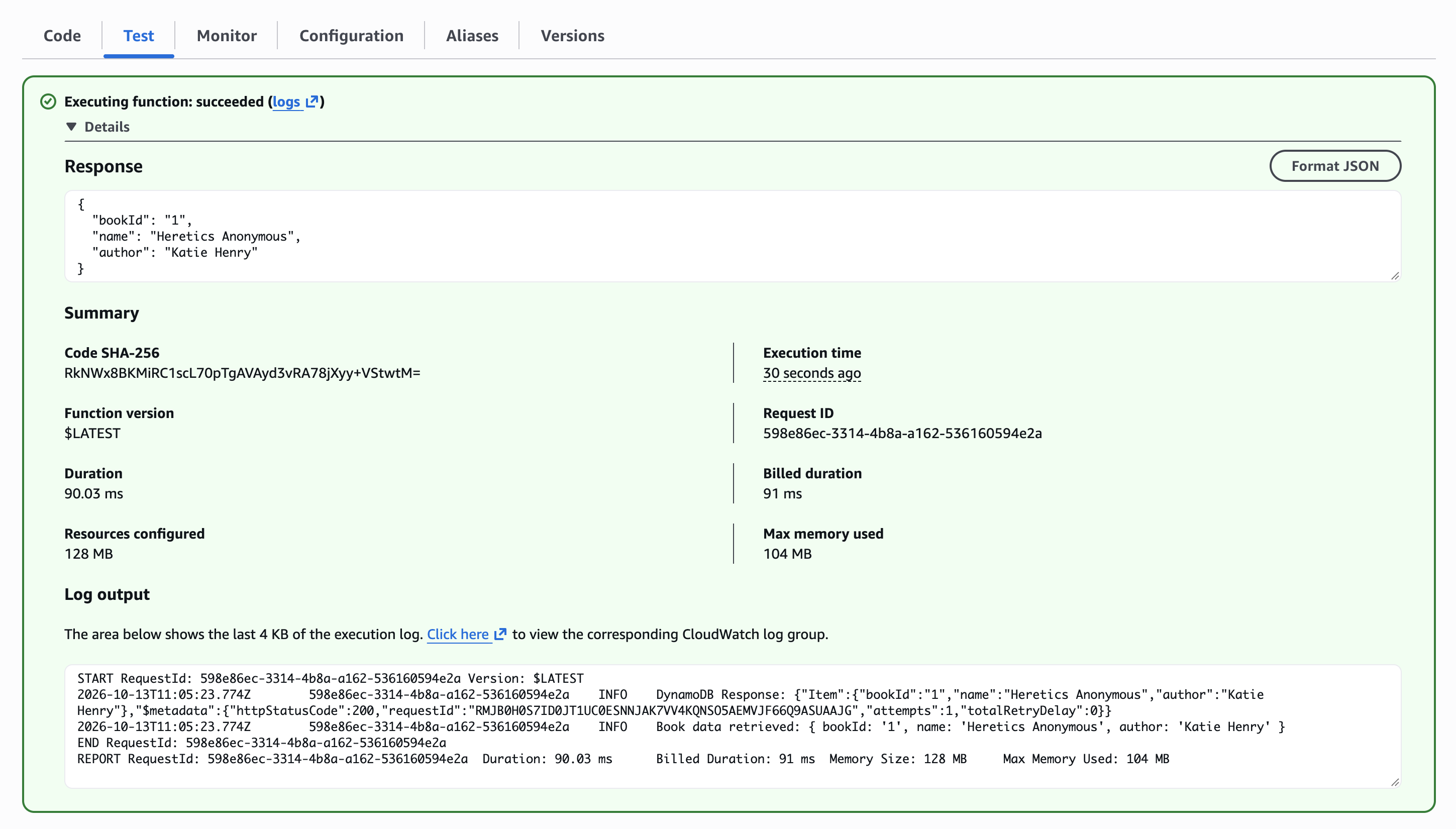
Testing Again
With the new policy attached, I reran my original test. And this time, my function successfully retrieved the book data! 🎉
The problem wasn’t my code or the database. It was an IAM permission issue.
5. Enhancing Security with Least Privilege
At this point, everything worked. But I wasn’t entirely happy with the permissions I’d granted.
Why give my Lambda function read access to all my DynamoDB tables when it only needs to retrieve a book from one?
This is where the principle of least privilege comes in. Least privilege means granting only the permissions required to perform a specific task.
For my project, the function only needed:
- Action:
dynamodb:GetItem - Resource: My
BookShelftable
Creating an Inline IAM Policy
I created an inline policy attached to my Lambda execution role.
Using the IAM visual policy editor, I selected DynamoDB as the service, GetItem as the allowed action, and specified the ARN of my BookShelf table.
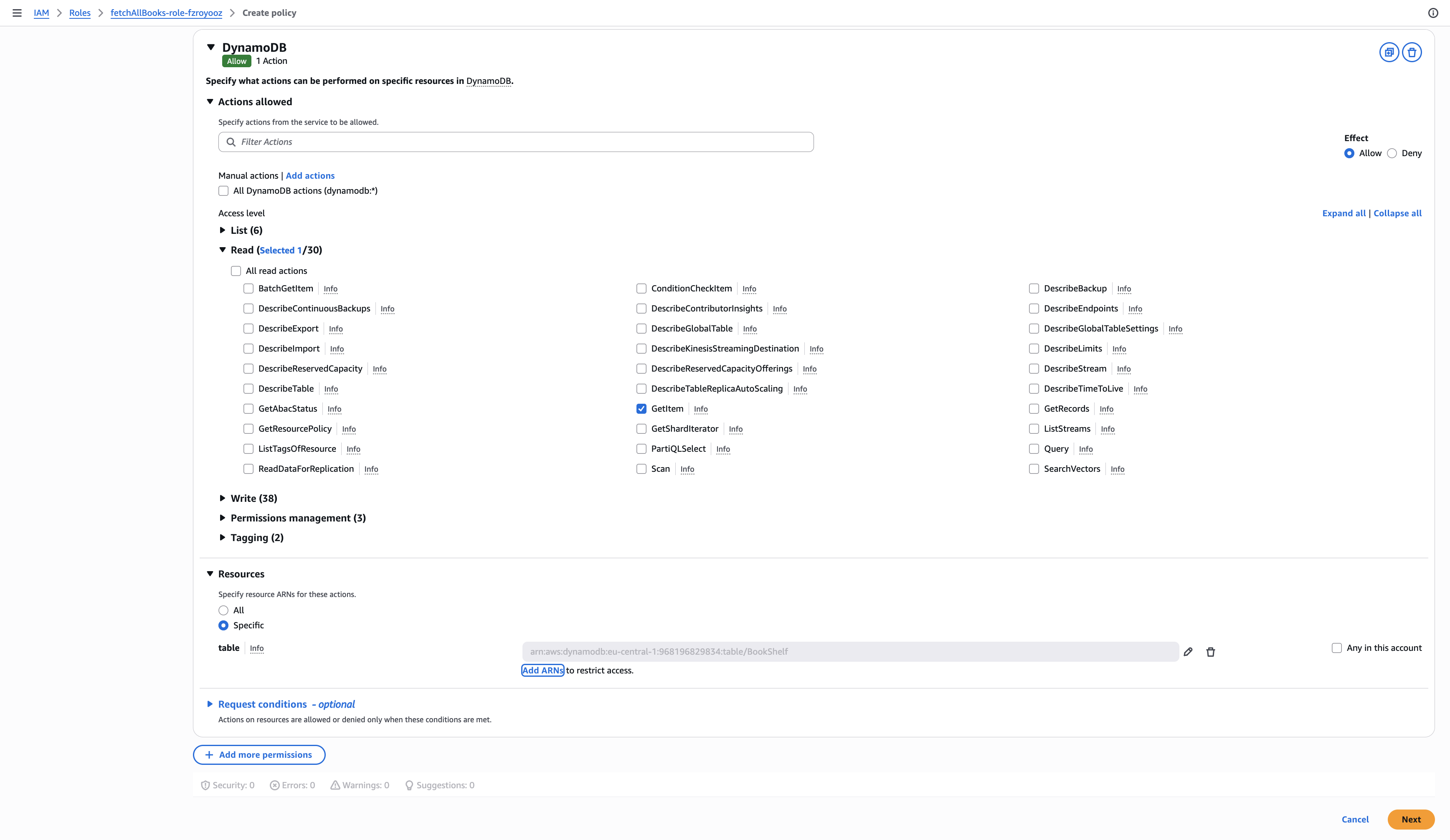
The resulting policy follows this structure:
{
  "Version": "2012-10-17",
  "Statement": [
    {
      "Effect": "Allow",
      "Action": "dynamodb:GetItem",
      "Resource": "arn:aws:dynamodb:REGION:ACCOUNT_ID:table/BookShelf"
    }
  ]
}
Replace REGION and ACCOUNT_ID with the actual values for your AWS environment.
This policy allows Lambda to retrieve individual items from my BookShelf table without granting it access to other tables.
I then removed the broader AmazonDynamoDBReadOnlyAccess policy while retaining the permissions needed for CloudWatch logging.
Updating IAM policies can accidentally break access to resources, so I ran my original Lambda test again.
And it still worked! ✨

6. What I Learned
This project took me approximately two hours to complete.
I went in wanting to understand how Lambda retrieves data from DynamoDB and came out with a much better understanding of IAM permissions.
A few things stood out:
- Lambda execution roles matter. Your function needs explicit permissions to access AWS resources.
- A successful invocation doesn’t always mean a successful operation. Always inspect your function’s response.
- IAM policies control what your function can do. For my project,
dynamodb:GetItemwas the missing permission. - Least privilege is important. Just because a policy works doesn’t mean it’s the most secure option.
I could also extend this project into a simple serverless web application by introducing Amazon API Gateway. A frontend could send requests through API Gateway to Lambda, which would retrieve the required data from DynamoDB.
But that’s a project for another day.
Final Thoughts
The most rewarding part of this project wasn’t simply retrieving data from DynamoDB. It was understanding why my Lambda function couldn’t retrieve it in the first place.
The biggest challenge was figuring out how IAM roles and policies work together, but troubleshooting that AccessDeniedException helped everything click.
Writing code that works is only half the adventure; the other half is convincing AWS to let it run. 💀
Have a project or engineering opportunity in mind? Get in touch with Sonia.