
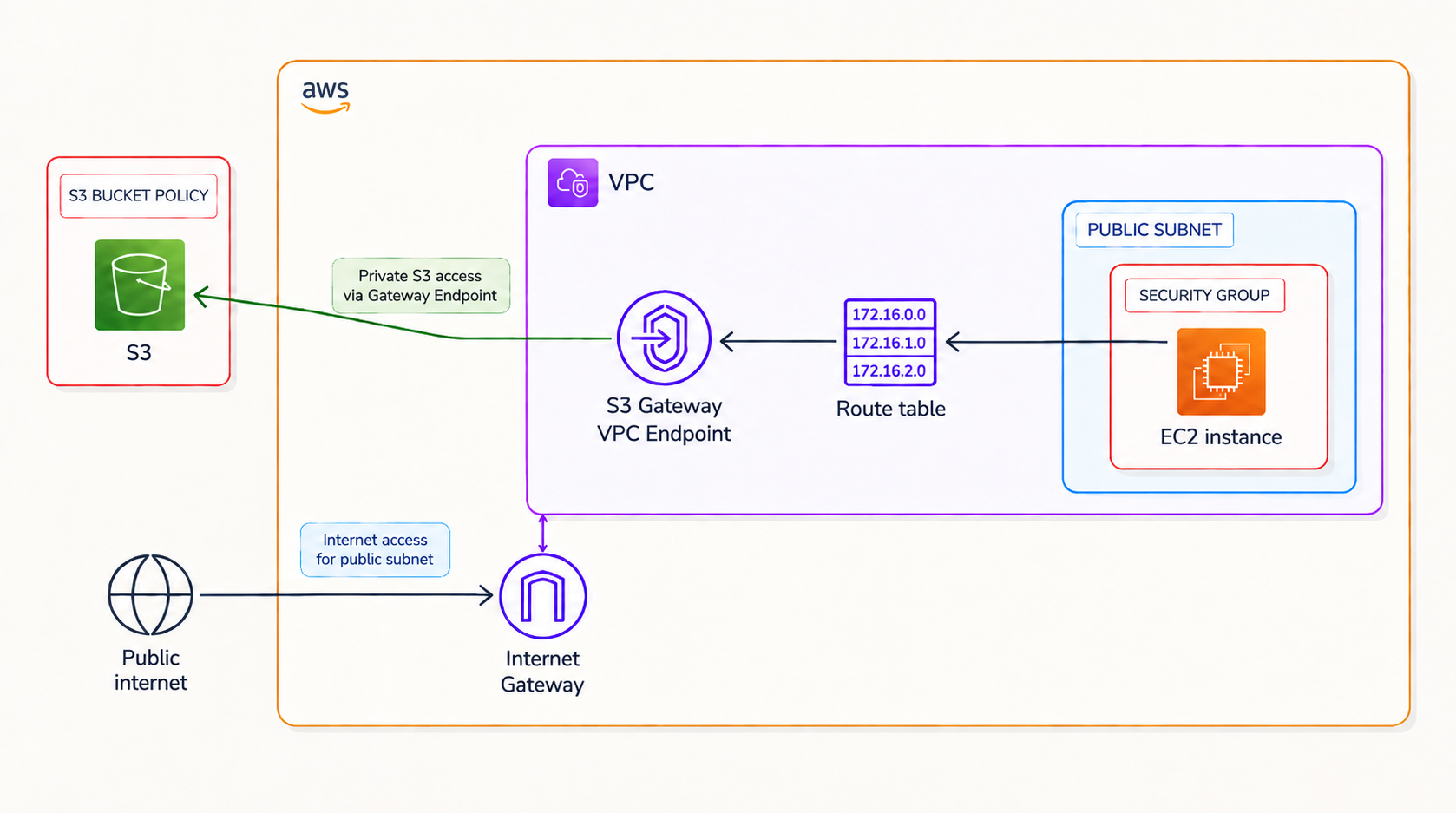
For this AWS networking project, I wanted to answer a pretty simple question:
If an EC2 instance needs to access an S3 bucket, does that traffic really need to go through the internet? TLDR: nope!
That is where VPC endpoints come in.
In this project, I created an Amazon VPC, launched an EC2 instance, connected it to an S3 bucket, and then configured an S3 Gateway VPC Endpoint so that traffic between my VPC and S3 could stay on the AWS network without requiring an Internet Gateway or NAT Gateway for that S3 access.
And, naturally, I broke access to my bucket along the way. For educational purposes. Obviously.
What I Built
My setup included:
- An Amazon VPC
- A public subnet
- A route table
- An Internet Gateway
- An EC2 instance
- An S3 bucket
- An S3 Gateway VPC Endpoint
- An S3 bucket policy
- A VPC endpoint policy
The basic idea was:
EC2 → Route Table → VPC Endpoint → Amazon S3Instead of relying on:
EC2 → Route Table → Internet Gateway → Amazon S3One important detail here: when an EC2 instance accesses S3 through an Internet Gateway, the traffic doesn’t necessarily wander around the public internet. AWS can keep that traffic on its network.
The important difference is that a Gateway VPC Endpoint removes the need for an Internet Gateway or NAT Gateway specifically for S3 connectivity.
First, What Exactly Is a VPC?
An Amazon Virtual Private Cloud (VPC) is a logically isolated virtual network that you define inside AWS.
I can choose things like:
- My IP address range
- Subnets
- Route tables
- Internet connectivity
- Network access rules
- How resources inside the VPC communicate
So rather than thinking of a VPC as a completely private little AWS island, I think of it as my own configurable network boundary inside AWS.
Whether resources inside it can reach the internet, or be reached from the internet, depends on how I configure things like route tables, Internet Gateways, public IP addresses, security groups, and Network ACLs.
Setting Up the Architecture
I started by creating my VPC networking setup.
- Created a VPC
- Created a public subnet
- Created and associated a route table
- Attached an Internet Gateway
- Launched an EC2 instance
- Created an S3 bucket
- Uploaded a few objects to the bucket
At this point, my EC2 instance and S3 bucket existed, but I hadn’t created the VPC endpoint yet. That was intentional.
I first wanted to confirm that the EC2 instance could access S3 normally before changing the network path.
Giving EC2 Permission to Talk to AWS
Before my EC2 instance could start casually rummaging through my S3 bucket, it needed AWS credentials and the correct permissions.
During the project, I experimented with access credentials and the AWS CLI.
An AWS access key consists of:
- An Access Key ID
- A Secret Access Key
The Access Key ID identifies the credentials, while the Secret Access Key is used when signing AWS API requests. These are very different from an EC2 key pair.
An EC2 key pair is primarily used to authenticate when connecting to an EC2 instance, such as through SSH.
AWS API credentials, on the other hand, are used when applications or tools like the AWS CLI make requests to AWS services.
The better real-world approach
For an application running on EC2, I would not normally store long-term access keys directly on the instance.
A better approach is to attach an IAM role to the EC2 instance through an instance profile. AWS can then provide temporary credentials automatically. That means:
- No hard-coded access keys
- No manually rotating credentials on the server
- Less chance of accidentally exposing a Secret Access Key
Testing Access to S3
Once the AWS CLI had credentials with the required S3 permissions, I tested access using:
aws s3 lsThis lists the S3 buckets that my current AWS identity has permission to see.
Before credentials were configured correctly, the CLI returned an authentication error. Once authentication was working, I could see my bucket. Progress. 🎉
Next, I ran:
aws s3 ls s3://tech-end-s3This listed the objects inside my bucket.
Listing objects inside the S3 bucket
So now I knew two things:
- My EC2 instance had working AWS credentials.
- Those credentials had permission to access the S3 bucket.
Uploading an Object From EC2 to S3
Next, I wanted to prove that the instance could do more than just stare at the bucket from a distance.
I created a file:
sudo touch /tmp/tech-end.txtThen uploaded it:
aws s3 cp /tmp/tech-end.txt s3://tech-end-s3Finally, I checked the bucket again:
aws s3 ls s3://tech-end-s3Uploading an object from EC2 to S3
And there it was. My beautiful empty text file had successfully travelled from EC2 into S3. ✨
Okay, But Where Is the Traffic Going?
At this point, my EC2 instance could communicate with S3. But now I wanted to change how that communication happened. This brought me to VPC endpoints.
What is a VPC endpoint?
A VPC endpoint lets resources inside a VPC access supported AWS services without requiring traffic to use an Internet Gateway, NAT Gateway, VPN connection, or AWS Direct Connect connection.
For this project, that service was Amazon S3.
Gateway vs Interface Endpoints
This part initially confused me, so here is the version that finally made sense.
There are multiple kinds of VPC endpoints, but the two you’ll hear about most often are:
a) Gateway Endpoints
Gateway endpoints are designed specifically for:
- Amazon S3
- Amazon DynamoDB
They work through the VPC’s route tables.
When I create an S3 Gateway endpoint and associate it with a route table, AWS adds a route for an AWS-managed S3 prefix list. Traffic destined for S3 can then use the Gateway endpoint.
b) Interface Endpoints
Interface endpoints work differently. They’re powered by AWS PrivateLink and create Elastic Network Interfaces with private IP addresses inside selected subnets. Many AWS services support interface endpoints.
Unlike Gateway endpoints, they can use security groups because they are represented by network interfaces inside the VPC.
S3 and DynamoDB can also support interface endpoints in supported configurations, but for straightforward access from resources inside a VPC, Gateway endpoints are often the simpler option.
Why Isn’t My S3 Bucket Inside My VPC?
This is another distinction that helped things click for me. My EC2 instance lives inside my VPC. My S3 bucket does not.
Amazon S3 is a regional AWS service managed outside my individual VPC.
That doesn’t mean S3 is sitting on the wild public internet waiting for someone to stumble into my bucket. It just means S3 isn’t deployed into one of my subnets the way an EC2 instance is.
Instead, AWS provides different mechanisms for resources in my VPC to reach the service.
A VPC endpoint is one of them.
Creating the S3 Gateway Endpoint
Now for the main event. I created a Gateway VPC Endpoint for Amazon S3. When creating the endpoint, I associated it with the route table used by my subnet.
AWS then adds a route conceptually similar to:
Destination: pl-xxxxxxxx
Target:      vpce-xxxxxxxx
The pl-xxxxxxxx value represents an AWS-managed prefix list containing the relevant IP ranges for the regional S3 service.
The vpce-xxxxxxxx value identifies my VPC endpoint.
So now, when traffic from my subnet is destined for S3, the route table can direct it toward the Gateway endpoint. The EC2 instance is the source of the traffic, not the route target.
Bucket Policies: “You Shall Only Enter Through This Door”
Creating the endpoint changes the network path. But I also wanted to restrict the S3 bucket so that requests had to come through my specific VPC endpoint.
That is where an S3 bucket policy came in. A bucket policy is a resource-based policy attached directly to an S3 bucket. Among other things, it can inspect conditions associated with an incoming request. For example, S3 supports the condition key:
aws:SourceVpceI could therefore create a policy that effectively says:
Deny requests to this bucket unless they came through this specific VPC endpoint.
I Immediately Locked Myself Out of the S3 Console 💀
Right after applying the policy, AWS started showing Access Denied messages when I tried accessing the bucket through the console.
S3 Access Denied after applying the endpoint restriction
At first, this looks alarming. But it actually demonstrated that the policy was working. My browser’s request to the S3 console wasn’t going through the VPC endpoint associated with my EC2 instance.
The policy basically looked at me and said:
You’re not on the list.
Which is also why you need to be careful when restricting S3 buckets using aws:SourceVpce.
One wrong endpoint ID and you can very enthusiastically lock yourself out.

Route Tables and the Endpoint
For Gateway endpoints, routing is an important part of the setup. When I associate a route table with my S3 Gateway endpoint, AWS manages the endpoint route for me.
Conceptually, the relevant route looks like:
S3 Prefix List → VPC EndpointRoute table after configuring the VPC endpoint
Traffic destined for S3 can now follow that route. One interesting detail is that the normal S3 DNS names still work.
I still run:
aws s3 ls s3://tech-end-s3The route table handles the network path underneath.
Endpoint Policies: Because Apparently One Policy Wasn’t Enough 😂
A VPC endpoint policy controls what resources or actions can be accessed through the endpoint. This is different from the bucket policy.
A rough mental model is:
IAM policy
What is this identity allowed to do?
S3 bucket policy
Who or what is allowed to access this bucket?
VPC endpoint policy
What requests are allowed through this endpoint?
These controls work together. The endpoint doesn’t magically grant permission to S3 resources. The request still has to satisfy the relevant IAM and resource policies.
I modified my endpoint policy to restrict access and immediately saw the effect from my EC2 instance.
Testing restrictions using the endpoint policy
Access that had previously worked was now denied.
Beautiful.
I had successfully broken my own infrastructure again.
For science. ✨
Finally, I tested access again from the EC2 instance. This time, S3 traffic could use:
EC2
 ↓
Route Table
 ↓
S3 Gateway VPC Endpoint
 ↓
Amazon S3
What I Learned
This project helped me understand that networking in AWS isn’t simply:
Can Resource A reach Resource B?
There are actually several separate questions.
Where is the traffic routed?
That’s where things like:
- Route tables
- Internet Gateways
- NAT Gateways
- VPC endpoints
come in.
Is the caller authenticated?
That’s where AWS credentials and IAM identities come in.
Is the caller authorized?
That’s where things like:
- IAM policies
- Bucket policies
- Endpoint policies
come in.
Does the request need an Internet Gateway?
For S3 traffic using a Gateway VPC Endpoint:
Nope.
And that distinction between network connectivity and authorization was probably my biggest takeaway from this project.
Before vs After
Before creating the endpoint:
EC2
 │
 ▼
Route Table
 │
 ▼
Internet Gateway
 │
 ▼
Amazon S3
For S3 traffic after creating the Gateway endpoint:
EC2
 │
 ▼
Route Table
 │
 ▼
S3 Gateway VPC Endpoint
 │
 ▼
Amazon S3
The second architecture means my VPC doesn’t need internet connectivity just to communicate with S3.
For workloads in private subnets, this can be especially useful because they can access S3 without needing a NAT Gateway purely for that traffic.
Final Thoughts
This project took me around four hours, but it cleared up something that had confused me for a while:
VPC endpoints aren’t really about giving your application permission to access another AWS service. They’re about giving the traffic a different network path.
IAM, Bucket policies and Endpoint policies still matter, but now the networking layer can say:
You don’t need to go that way. We have a route for this.
And suddenly VPC endpoints make a lot more sense.
Have a project or engineering opportunity in mind? Get in touch with Sonia.